How a Web Request Reaches an ASP.NET Core Application
This article follows a web request from a user's browser to an ASP.NET Core MVC application running on an AWS EC2 Linux server. It explains how DNS, an Elastic IP, HTTPS, Nginx, Kestrel, controllers, and Razor views work together to return a web page.
- Topic
- Web Deployment and Request Routing
- Estimated Reading Time
- 7 minutes
- Last Updated
- September 2026
The Complete Request Path
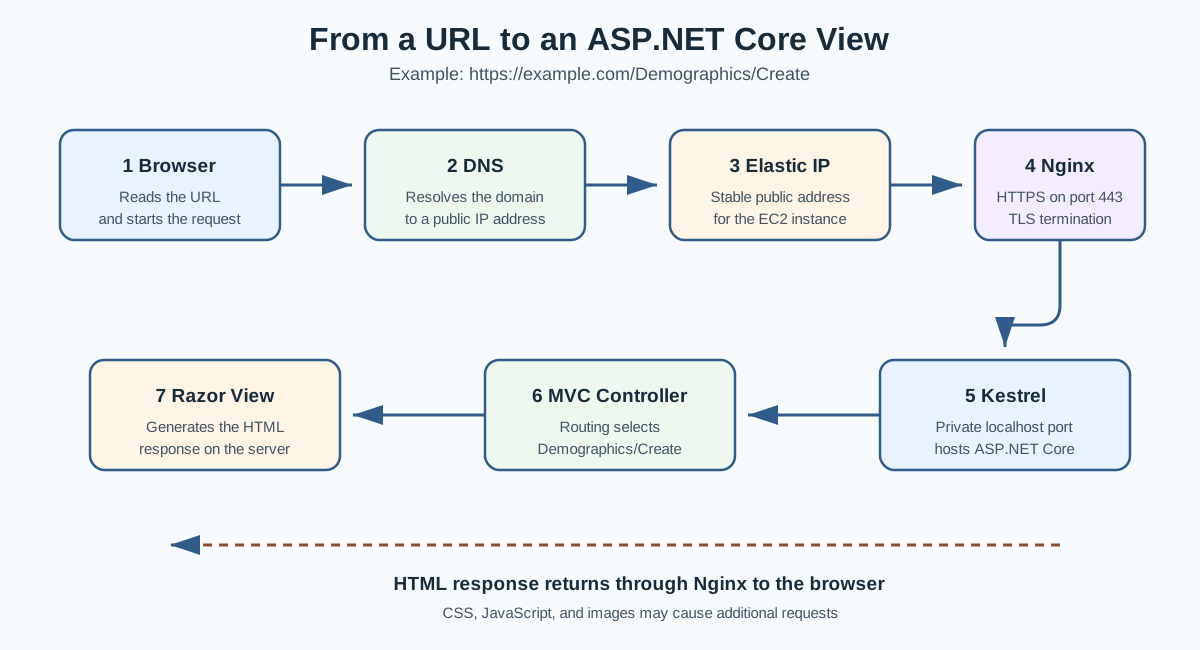
Suppose a user enters the following URL into a browser:
https://example.com/Demographics/CreateThe request travels through several systems before the ASP.NET Core application generates the page:
- The browser identifies the domain name and requested path in the URL.
- DNS resolves the domain name to the server's AWS Elastic IP address.
- The browser connects to that IP address using HTTPS on port 443.
- Nginx receives the public request and handles the HTTPS connection.
- Nginx forwards the request to Kestrel on a private localhost port.
- ASP.NET Core routing selects the appropriate controller action.
- The controller returns a Razor view.
- The generated response travels back through Nginx to the browser.
- The browser renders the returned HTML as a visible page.
The basic request-and-response behavior is covered in more detail in the HTTP Cycle article. This article concentrates on the deployment systems that the request passes through before and after the HTTP cycle inside the application.
Domain Names and DNS
A domain name, such as example.com, gives users a readable address for a
website. Computers communicate using IP addresses, so the browser must first determine
which IP address belongs to the domain.
The Domain Name System, or DNS, performs this lookup. An A record in the
domain's DNS configuration connects the domain name to the server's public IPv4
address.
example.com → 203.0.113.10DNS does not send the request to the ASP.NET Core controller. It only helps the browser find the public IP address of the correct server. After receiving the IP address, the browser opens a network connection to that server.
AWS Elastic IP
An EC2 instance can receive a public IP address, but an automatically assigned public address may change when the instance is stopped and started. This would cause the domain's DNS record to point to the wrong address.
An AWS Elastic IP is a static public IPv4 address assigned to an AWS account and associated with an EC2 instance. Because the address remains stable, the domain's DNS record can continue pointing to the same address when the server is restarted.
When DNS returns the Elastic IP, the browser sends the request to the EC2 server associated with that address.
HTTPS and TLS
The https portion of the URL tells the browser to create an encrypted
connection using Transport Layer Security, or TLS. HTTPS protects information while it
travels between the browser and the server.
The server presents a TLS certificate containing information about the domain. The browser checks whether the certificate matches the requested domain, is currently valid, and can be traced to a trusted Certificate Authority.
A Certificate Authority verifies domain control and digitally signs certificates. Let's Encrypt is a Certificate Authority that provides trusted certificates through an automated process. On this deployment, Nginx uses the certificate to establish the HTTPS connection with the browser.
After the TLS connection is established, the browser and server can exchange encrypted
HTTP messages. Public HTTPS traffic normally uses port 443.
Nginx as a Reverse Proxy
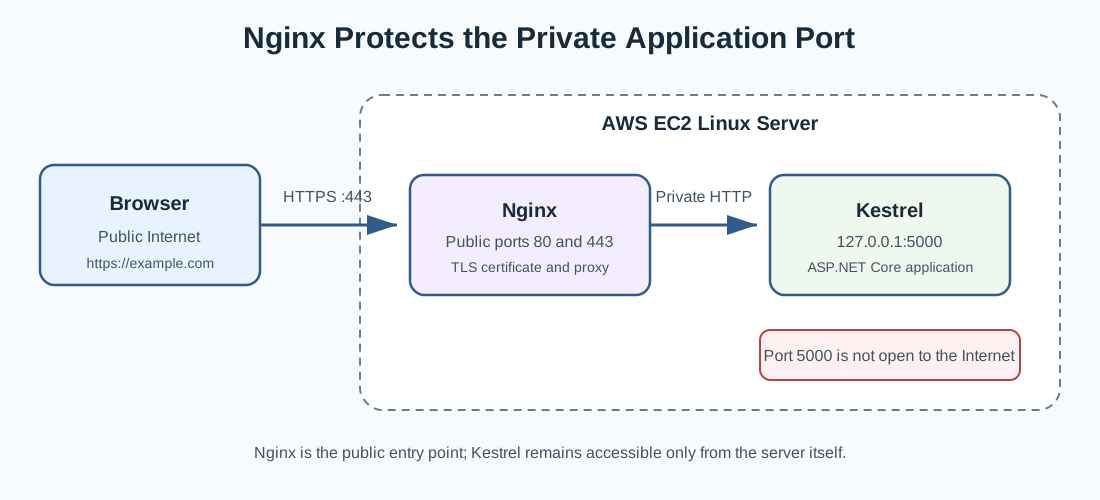
Nginx is the public-facing web server. It listens for requests arriving on ports
80 and 443. Port 80 is normally used for HTTP, while port 443
is used for HTTPS.
Nginx acts as a reverse proxy. A reverse proxy accepts a request from a client and forwards that request to another server process. In this system, Nginx forwards the request to the ASP.NET Core application running locally on the EC2 instance.
Public request:  https://example.com/Demographics/Create
Internal request: http://127.0.0.1:5000/Demographics/Create
The exact localhost port depends on the application's configuration. Port
5000 is an example and should be replaced with the port used by the
deployed application.
Kestrel and ASP.NET Core
Kestrel is the web server included with ASP.NET Core. It receives the request that Nginx forwarded to the application's localhost address.
The request then enters the ASP.NET Core middleware pipeline. Middleware can perform tasks such as error handling, redirecting HTTP requests to HTTPS, serving static files, applying authorization rules, and routing requests to application endpoints.
Routing examines the URL path and HTTP method. For the example URL, a conventional MVC
route can select the Create action in
DemographicsController.
/Demographics/Create
        ↓
DemographicsController.Create()
Controllers and Views
The controller action handles the application-specific part of the request. A
GET version of the action may prepare a view model and display an empty
form. A POST version may receive submitted form values, validate them, and
save valid data.
public IActionResult Create()
{
    return View();
}
When the action calls View(), ASP.NET Core locates the corresponding Razor
view. For this example, it may look for:
Views/Demographics/Create.cshtmlRazor combines HTML with any server-side C# expressions needed by the page. The Razor view is executed on the server and produces HTML. The browser receives the resulting HTML, not the original Razor or C# source code.
The Response Returns to the Browser
After ASP.NET Core produces the response, it follows the reverse path:
- Kestrel sends the HTTP response to Nginx.
- Nginx sends the response through the encrypted HTTPS connection.
- The browser receives the response and checks its status code and headers.
- The browser parses the HTML and requests any required CSS, JavaScript, or images.
- The browser renders the completed page for the user.
ASP.NET Core → Kestrel → Nginx → HTTPS → BrowserRequests for stylesheets, scripts, and images repeat a similar request-and-response process. The browser may therefore make several additional requests before the complete page is displayed.
Why the Internal Port Stays Private
Internet users should connect to Nginx through ports 80 and
443. The Kestrel port should normally listen only on localhost and should
not be publicly opened in the EC2 security group.
This arrangement gives the application a smaller public attack surface. Nginx handles public connections and TLS certificates, while Kestrel concentrates on running the ASP.NET Core application.
Public:  Browser → Nginx on port 443
Private: Nginx → Kestrel on localhost
Summary
A browser first uses DNS to translate a domain name into an Elastic IP address. It then creates an HTTPS connection to Nginx on the EC2 server. Nginx forwards the request to Kestrel on a private localhost port. ASP.NET Core routing selects a controller action, the controller returns a Razor view, and the generated response travels back through Nginx to the browser.
Each part has a separate responsibility. DNS locates the server, the Elastic IP provides a stable public address, TLS protects network traffic, Nginx manages public requests, Kestrel hosts ASP.NET Core, and MVC determines how the application processes the requested path.