How Form Data Moves Through ASP.NET Core MVC
Helpful resources for understanding how form data moves through ASP.NET Core MVC applications.
Form data moves through ASP.NET Core MVC when a user submits a form and the browser sends the data to a controller action. The controller processes the submitted data and returns a response, such as displaying a new view or redirecting to another page.
- Topic
- Web Development
- Estimated Reading Time
- 5 minutes
- Last Updated
- September 2026
Overview
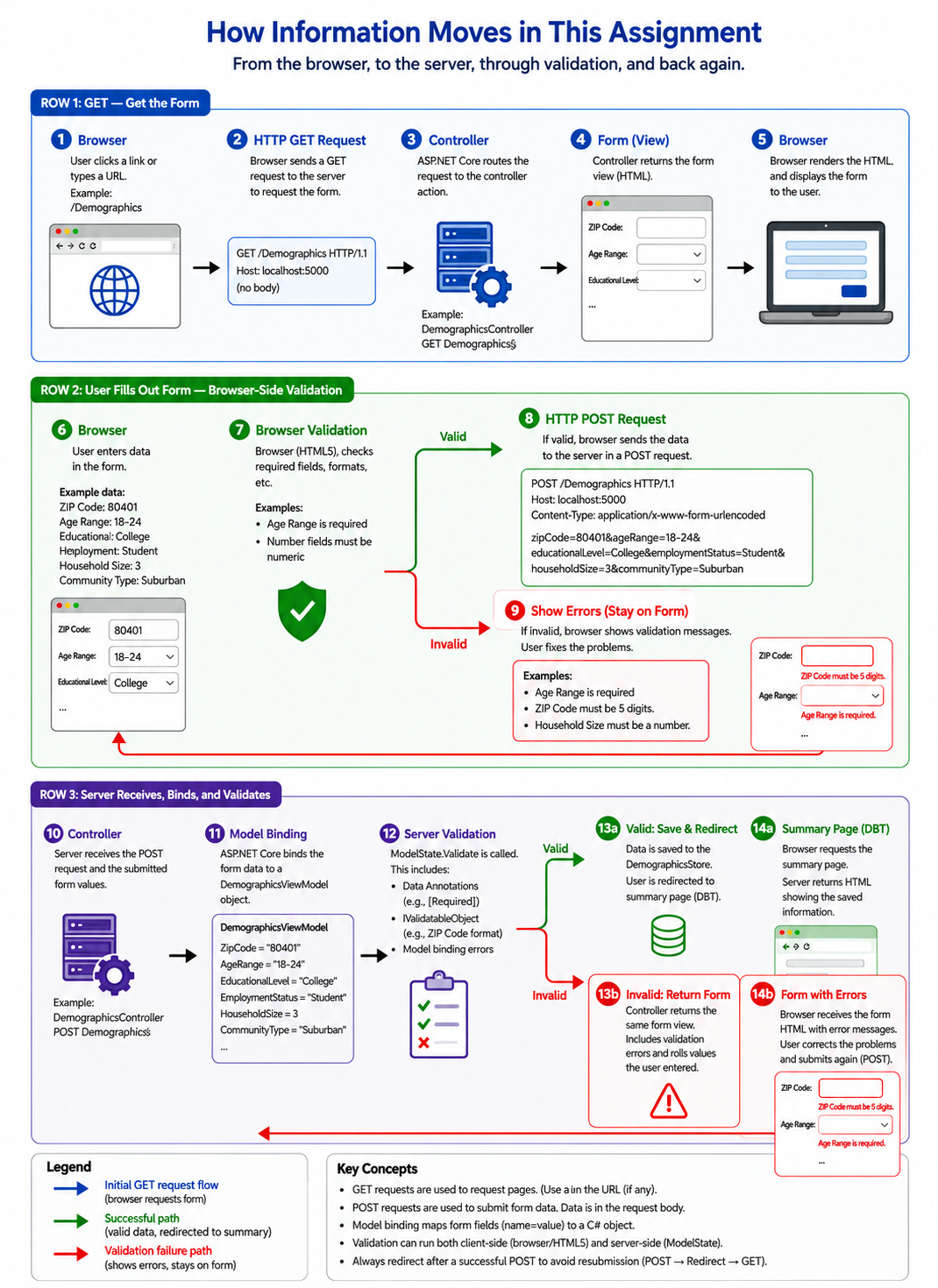
The form processing flow in ASP.NET Core MVC is shown in the image below.
GET and POST requests
A GET request asks the server for a resource, such as the Edit Demographics page. The Edit GET action returns a view containing the form and any previously saved values.
A POST request submits information for the server to process. When someone clicks Save demographics, the browser sends the form data to the Edit POST action.
How the browser sends form data
The browser sends form data as name/value pairs. Each submitted control supplies a name that identifies the field and a value containing the user's entry or selection. For this POST form, these pairs are sent in the request body.
For example, these controls could submit a birth year of 2000 and a student status of true:
BirthYear=2000&CurrentlyStudent=trueThe HTML name attribute connects a submitted control to a ViewModel property. A control named BirthYear supplies the value for the BirthYear property. The id attribute can connect a label to a control, but it does not determine the submitted field name. Using asp-for generates the appropriate name automatically.
For a dropdown, the selected option's value is submitted. For example, an option labeled "Yes" can submit the value "true".
Model binding creates the C# object
ASP.NET Core model binding creates a DemographicViewModel for the controller action. It matches submitted field names to properties and converts the submitted text into the types those properties require.
For example, the submitted text "2000" becomes an integer in BirthYear, while "true" becomes a Boolean value in CurrentlyStudent. The controller receives the populated object through its demographic parameter.
If a value cannot be converted, such as entering letters for a birth year, model binding records an error in ModelState.
Checking the submitted information
Attribute-based validation
Validation attributes declare rules on the ViewModel properties. Required checks that a value was supplied, Range limits numeric values, and StringLength limits the length of text. ASP.NET Core evaluates these rules before the controller action processes the model.
Controller validation
The controller can also check rules manually. For example, our Edit action checks whether BirthYear is between 1900 and the current year. If it is outside that range, the action adds an error to ModelState under BirthYear so the view can display it beside that field.
Checking ModelState
ModelState holds submitted values and errors from model binding and validation. ModelState.IsValid is true when no errors have been recorded. The controller uses this result to decide whether to redisplay the form or save the information.
Why an invalid submission returns Edit
When ModelState.IsValid is false, the POST action returns the Edit view with the submitted model. This gives the user a chance to correct mistakes before anything is saved.
Returning the view keeps ModelState available in the same request. Form Tag Helpers can redisplay attempted values, and validation messages can explain what needs correcting. Returning a view does not run the Edit GET action.
if (!ModelState.IsValid)
{
    return View(demographic);
}
Why a valid submission redirects to Index
When the submitted information is valid, the controller saves the model in currentDemographic and redirects to the Index action. The browser follows the redirect with a new GET request, and Index displays the saved information.
This sequence is called Post/Redirect/Get. Refreshing the resulting page repeats the GET request instead of submitting the form again.
currentDemographic = demographic;
return RedirectToAction(nameof(Index));
Example of a successful submission
-
GET /Demographic/Editrequests the form. -
POST /Demographic/Editsubmits the form for model binding, validation, and saving. -
GET /Demographicfollows the redirect and displays the saved information.
Why static storage is temporary
The currentDemographic static field keeps information in the running application's memory. It can retain that information between requests, but it does not write it to a database or file.
When the application restarts, its previous in-memory data is lost and the field starts empty again. The field is also shared across requests and users within the running application, so it does not provide a separate demographic profile for each person.